

Recomposition is fundamental to Compose, yet it is often misunderstood, which leads to many myths going around our community. In this article I will explain how composition and recomposition work in simple terms.
This article took some parts from the course Advanced Compose I am currently working on. This course dives deep into Compose topics that are important yet often misunderstood by Compose developers.
Composition is pretty straightforward: composable functions are actually executed like regular functions, but under the hood they receive an additional parameter of type
Composer, that allows storing values (remember), reading CompositionLocal values, or emitting UI. Components use it to add components to UI tree. Let's see it in an example:import androidx.compose.animation.* import androidx.compose.animation.core.* import androidx.compose.foundation.* import androidx.compose.foundation.layout.* import androidx.compose.foundation.text.* import androidx.compose.material3.* import androidx.compose.runtime.* import androidx.compose.runtime.saveable.* import androidx.compose.runtime.snapshots.* import androidx.compose.ui.* import androidx.compose.ui.draw.* import androidx.compose.ui.input.pointer.* import androidx.compose.ui.unit.* import androidx.compose.ui.window.* import androidx.compose.ui.geometry.* import androidx.compose.ui.graphics.* import androidx.compose.ui.graphics.vector.* import androidx.compose.ui.graphics.drawscope.* import androidx.compose.ui.semantics.* import androidx.compose.ui.text.font.* import androidx.compose.ui.text.style.* import androidx.compose.ui.text.input.* import androidx.compose.ui.layout.* import androidx.compose.ui.platform.* import androidx.compose.ui.node.* import androidx.compose.ui.text.* import androidx.compose.foundation.lazy.grid.* import androidx.compose.foundation.selection.* import androidx.compose.foundation.shape.* import androidx.compose.foundation.gestures.* import androidx.compose.foundation.lazy.* import androidx.compose.foundation.interaction.* import androidx.lifecycle.compose.* import kotlinx.browser.document import kotlinx.coroutines.* import kotlinx.coroutines.flow.* import kotlin.math.* //sampleStart @Preview @Composable fun Counter() { var counter by remember { mutableStateOf(0) } Row(verticalAlignment = Alignment.CenterVertically) { Button(onClick = { counter++ }) { Text("+") } Text("$counter", modifier = Modifier.padding(16.dp)) Button(onClick = { counter-- }) { Text("-") } } } //sampleEnd @OptIn(ExperimentalComposeUiApi::class) fun main() { ComposeViewport(document.body!!) { Box(modifier = Modifier.size(300.dp, 600.dp)) { Counter() } } } annotation class Preview
How is this view built based on the
Counter function? When we start composition (using a function like setContent) its lambda is executed to build the UI tree in a process called composition (in this case, I use Compose on WASM, so ComposeViewport starts composition). Counter calls whatever is inside its body, so remember and Row. remember creates a state that persists recomposition and returns its reference. Row emits UI, so adds a node to our UI tree under Counter component. It also needs to get composed, so its lambda gets called. It includes Row, Button and Row children, so as those functions get called, they each emit their own nodes to the UI tree. This process continues recursively until all composables are executed and the whole UI tree is built.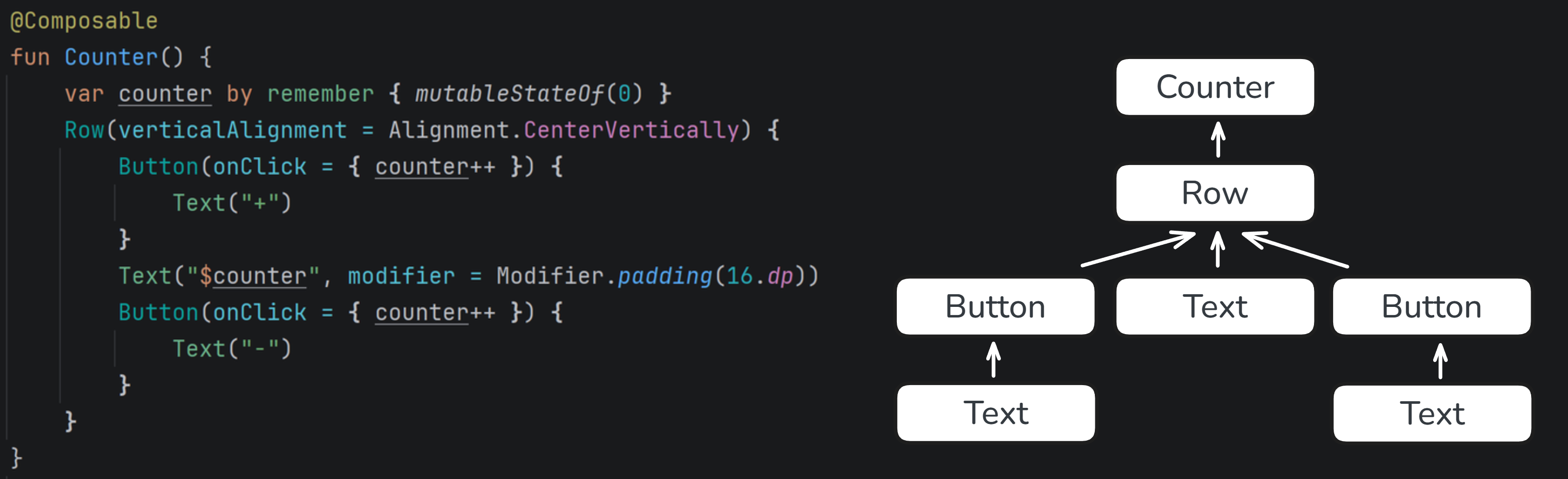
This way a UI tree is built, which is then measured in the layout phase and finally drawn in the drawing phase. However, application state changes, and to have our UI updated, this state must be represented with a snapshot state.
In Compose,
androidx.compose.runtime.State type, known as "snapshot state", has a very special property: when its value changes, Compose automatically triggers recomposition of all composables that read that state.Recomposition is similar to composition, but it updates the existing UI tree instead of building it from scratch. When recomposition happens, only the parts of the UI that read changed state are recomposed. This composition can propagate to those UI children.
In Compose, we typically create local state with
remember and mutableStateOf, which returns a State<T> object. We can also use delegation for easier use:val state by remember { mutableStateOf(initial) }
However, most state is stored in view models in
StateFlow. Reading it in compose would be incorrect, because its changes would not trigger recomposition.import androidx.compose.animation.* import androidx.compose.animation.core.* import androidx.compose.foundation.* import androidx.compose.foundation.layout.* import androidx.compose.foundation.text.* import androidx.compose.material3.* import androidx.compose.runtime.* import androidx.compose.runtime.saveable.* import androidx.compose.runtime.snapshots.* import androidx.compose.ui.* import androidx.compose.ui.draw.* import androidx.compose.ui.input.pointer.* import androidx.compose.ui.unit.* import androidx.compose.ui.window.* import androidx.compose.ui.geometry.* import androidx.compose.ui.graphics.* import androidx.compose.ui.graphics.vector.* import androidx.compose.ui.graphics.drawscope.* import androidx.compose.ui.semantics.* import androidx.compose.ui.text.font.* import androidx.compose.ui.text.style.* import androidx.compose.ui.text.input.* import androidx.compose.ui.layout.* import androidx.compose.ui.platform.* import androidx.compose.ui.node.* import androidx.compose.ui.text.* import androidx.compose.foundation.lazy.grid.* import androidx.compose.foundation.selection.* import androidx.compose.foundation.shape.* import androidx.compose.foundation.gestures.* import androidx.compose.foundation.lazy.* import androidx.compose.foundation.interaction.* import androidx.lifecycle.compose.* import kotlinx.browser.document import kotlinx.coroutines.* import kotlinx.coroutines.flow.* import kotlin.math.* //sampleStart class CounterViewModel { private val _counter = MutableStateFlow(0) val counter: StateFlow<Int> get() = _counter fun increment() { _counter.value++ } fun decrement() { _counter.value-- } } @Preview @Composable fun CounterScreen( viewModel: CounterViewModel = remember { CounterViewModel() } ) { Counter( value = viewModel.counter.value, onIncrement = { viewModel.increment() }, onDecrement = { viewModel.decrement() } ) } //sampleEnd @Composable fun Counter(value: Int, onIncrement: () -> Unit, onDecrement: () -> Unit) { Row(verticalAlignment = Alignment.CenterVertically) { Button(onClick = onIncrement) { Text("+") } Text("$value", modifier = Modifier.padding(16.dp)) Button(onClick = onDecrement) { Text("-") } } } @OptIn(ExperimentalComposeUiApi::class) fun main() { ComposeViewport(document.body!!) { Box(modifier = Modifier.size(300.dp, 600.dp)) { CounterScreen() } } } annotation class Preview
The right way to observe
StateFlow in Compose is collectAsStateWithLifecycle, which under the hood creates a snapshot state, remembers it and sets a listener to update it whenever the flow emits a new value. This ensures that recomposition is triggered when the state changes, keeping the UI up-to-date.import androidx.compose.animation.* import androidx.compose.animation.core.* import androidx.compose.foundation.* import androidx.compose.foundation.layout.* import androidx.compose.foundation.text.* import androidx.compose.material3.* import androidx.compose.runtime.* import androidx.compose.runtime.saveable.* import androidx.compose.runtime.snapshots.* import androidx.compose.ui.* import androidx.compose.ui.draw.* import androidx.compose.ui.input.pointer.* import androidx.compose.ui.unit.* import androidx.compose.ui.window.* import androidx.compose.ui.geometry.* import androidx.compose.ui.graphics.* import androidx.compose.ui.graphics.vector.* import androidx.compose.ui.graphics.drawscope.* import androidx.compose.ui.semantics.* import androidx.compose.ui.text.font.* import androidx.compose.ui.text.style.* import androidx.compose.ui.text.input.* import androidx.compose.ui.layout.* import androidx.compose.ui.platform.* import androidx.compose.ui.node.* import androidx.compose.ui.text.* import androidx.compose.foundation.lazy.grid.* import androidx.compose.foundation.selection.* import androidx.compose.foundation.shape.* import androidx.compose.foundation.gestures.* import androidx.compose.foundation.lazy.* import androidx.compose.foundation.interaction.* import androidx.lifecycle.compose.* import kotlinx.browser.document import kotlinx.coroutines.* import kotlinx.coroutines.flow.* import kotlin.math.* //sampleStart class CounterViewModel { private val _counter = MutableStateFlow(0) val counter: StateFlow<Int> get() = _counter fun increment() { _counter.value++ } fun decrement() { _counter.value-- } } @Preview @Composable fun CounterScreen( viewModel: CounterViewModel = remember { CounterViewModel() } ) { val value by viewModel.counter.collectAsStateWithLifecycle() Counter( value = value, onIncrement = { viewModel.increment() }, onDecrement = { viewModel.decrement() } ) } //sampleEnd @Composable fun Counter(value: Int, onIncrement: () -> Unit, onDecrement: () -> Unit) { Row(verticalAlignment = Alignment.CenterVertically) { Button(onClick = onIncrement) { Text("+") } Text("$value", modifier = Modifier.padding(16.dp)) Button(onClick = onDecrement) { Text("-") } } } @OptIn(ExperimentalComposeUiApi::class) fun main() { ComposeViewport(document.body!!) { Box(modifier = Modifier.size(300.dp, 600.dp)) { CounterScreen() } } } annotation class Preview
So recomposition starts from state readers. As those components get recomposed, they call their bodies again and trigger their children's recomposition. This is how recomposition propagates down the tree.
However, components can skip recomposition. By default, they skip recomposition if their arguments haven't changed since the last composition/recomposition. How do we compare current values with previous ones? That depends on their stability, so we will discuss that in the Stability section.
Consider the following example:
import androidx.compose.animation.*
import androidx.compose.animation.core.*
import androidx.compose.foundation.*
import androidx.compose.foundation.layout.*
import androidx.compose.foundation.text.*
import androidx.compose.material3.*
import androidx.compose.runtime.*
import androidx.compose.runtime.saveable.*
import androidx.compose.runtime.snapshots.*
import androidx.compose.ui.*
import androidx.compose.ui.draw.*
import androidx.compose.ui.input.pointer.*
import androidx.compose.ui.unit.*
import androidx.compose.ui.window.*
import androidx.compose.ui.geometry.*
import androidx.compose.ui.graphics.*
import androidx.compose.ui.graphics.vector.*
import androidx.compose.ui.graphics.drawscope.*
import androidx.compose.ui.semantics.*
import androidx.compose.ui.text.font.*
import androidx.compose.ui.text.style.*
import androidx.compose.ui.text.input.*
import androidx.compose.ui.layout.*
import androidx.compose.ui.platform.*
import androidx.compose.ui.node.*
import androidx.compose.ui.text.*
import androidx.compose.foundation.lazy.grid.*
import androidx.compose.foundation.selection.*
import androidx.compose.foundation.shape.*
import androidx.compose.foundation.gestures.*
import androidx.compose.foundation.lazy.*
import androidx.compose.foundation.interaction.*
import androidx.lifecycle.compose.*
import kotlinx.browser.document
import kotlinx.coroutines.*
import kotlinx.coroutines.flow.*
import kotlin.math.*

//sampleStart
@Preview
@Composable
fun ArtistScreen() {
    var artist by remember { mutableStateOf(Artist("Bob")) }
    Column(modifier = Modifier.padding(32.dp)) {
        ArtistCard(artist)
        Text(
            "Make popular",
            modifier = Modifier.clickable {
                artist = artist.copy(name = "Great " + artist.name)
            }
        )
    }
}

@Composable
fun ArtistCard(artist: Artist) {
    Column {
        ArtistImage(imageUrl = artist.imageUrl)
        ArtistName(name = artist.name)
    }
}
//sampleEnd

data class Artist(
    val name: String = "Unknown artist",
    val imageUrl: String = "https://via.placeholder.com/150",
)

@Composable
fun ArtistImage(imageUrl: String) {
    Text(text = "Image from $imageUrl")
}

@Composable
fun ArtistName(name: String) {
    Text(text = name)
}

@OptIn(ExperimentalComposeUiApi::class)
fun main() {
    ComposeViewport(document.body!!) {
        Box(modifier = Modifier.size(300.dp, 600.dp)) {
            ArtistScreen()
        }
    }
}

annotation class Preview
When "Make popular" gets clicked,
artist state value changes. We observe it in ArtistScreen, so it should get recomposed and propagate it to ArtistCard (this is not strictly true, as since artist is directly passed to children, Compose should be able to optimize it and skip recompositon for ArtistScreen). ArtistCard gets recomposed (this one for sure), and pass values to its children. ArtistName recives different value, so it gets recomposed, while ArtistImage recives the same imageUrl, so it will skip recomposition. This way UI gets updated.Now let's see what would happen if we passed value providers, so lambda expressions returning values, instead of values directly.
import androidx.compose.animation.*
import androidx.compose.animation.core.*
import androidx.compose.foundation.*
import androidx.compose.foundation.layout.*
import androidx.compose.foundation.text.*
import androidx.compose.material3.*
import androidx.compose.runtime.*
import androidx.compose.runtime.saveable.*
import androidx.compose.runtime.snapshots.*
import androidx.compose.ui.*
import androidx.compose.ui.draw.*
import androidx.compose.ui.input.pointer.*
import androidx.compose.ui.unit.*
import androidx.compose.ui.window.*
import androidx.compose.ui.geometry.*
import androidx.compose.ui.graphics.*
import androidx.compose.ui.graphics.vector.*
import androidx.compose.ui.graphics.drawscope.*
import androidx.compose.ui.semantics.*
import androidx.compose.ui.text.font.*
import androidx.compose.ui.text.style.*
import androidx.compose.ui.text.input.*
import androidx.compose.ui.layout.*
import androidx.compose.ui.platform.*
import androidx.compose.ui.node.*
import androidx.compose.ui.text.*
import androidx.compose.foundation.lazy.grid.*
import androidx.compose.foundation.selection.*
import androidx.compose.foundation.shape.*
import androidx.compose.foundation.gestures.*
import androidx.compose.foundation.lazy.*
import androidx.compose.foundation.interaction.*
import androidx.lifecycle.compose.*
import kotlinx.browser.document
import kotlinx.coroutines.*
import kotlinx.coroutines.flow.*
import kotlin.math.*

//sampleStart
@Preview
@Composable
fun ArtistScreen() {
    var artist by remember { mutableStateOf(Artist("Bob")) }
    Column(modifier = Modifier.padding(32.dp)) {
        ArtistCard({ artist })
        Text(
            "Make popular",
            modifier = Modifier.clickable {
                artist = artist.copy(name = "Great " + artist.name)
            }
        )
    }
}

@Composable
fun ArtistCard(artistProvider: () -> Artist) {
    Column {
        ArtistImage(imageUrlProvider = { artistProvider().imageUrl })
        ArtistName(nameProvider = { artistProvider().name })
    }
}
//sampleEnd

data class Artist(
    val name: String = "Unknown artist",
    val imageUrl: String = "https://via.placeholder.com/150",
)

@Composable
fun ArtistImage(imageUrlProvider: () -> String) {
    Text(text = "Image from ${imageUrlProvider()}")
}

@Composable
fun ArtistName(nameProvider: () -> String) {
    Text(text = nameProvider())
}

@OptIn(ExperimentalComposeUiApi::class)
fun main() {
    ComposeViewport(document.body!!) {
        Box(modifier = Modifier.size(300.dp, 600.dp)) {
            ArtistScreen()
        }
    }
}

annotation class Preview
Who reads
uiState now? ArtistImage and ArtistName. So on state change, only those components will get recomposed. Text inside ArtistImage will skip recomposition, and Text inside ArtistName will recompose. This is why value providers can limit recomposition, them move reading closed to where this state is needed.That doesn't mean we should use provider functions. Provider functions are less readable and intuitive than values, and we should value readability over premature optimization. They also introduce additional costs related to lambda creation and maintenance (memoization and updating). It is one of recomposition optimization techniques to consider when we have issues with component performance, but you should always track performance before and after using it to know if it makes sense.
In this article I showed an essential explanation how composition and recomposition work. Those processes are simpler than what most people think. Snapshot state sets listeners to recompose all composition scopes that read their state. Then recomposition can propagate down to children.
Recomposition and other related topics, like stability, derived state, component identity, are covered in the first days of the Advanced Compose cohort course. On later days, there is deep dive into other Compose phases, modifiers, navigation, architecture and other topics that many Compose developers consider though, but that are actually quite simple if explained well and with a focus on practical use and best practices.
