

On web, every page can be easily reloaded. Users don't use mobile application to have fewer possibilities than on web. It is a terrible UX when user is waiting for something, and needs to kill app and start it again to have some screen refreshed (and yet it is not so uncommon). Remember, even if user changes its own remote data, it is possible that those data are modified on another device. Every screen that loads data should give an option to reload it. The only exception is when our application establishes a connection with backend and immediately receives all updates.
For static screens, such as an error screen or some details screen, we should provide some button to reload. For lists, the standard approach in 2026 is pull-to-refresh. Though pull-to-refresh must be correctly implemented. The most important rule is that user should not be punished for refreshing. If data were displayed before refreshing, they should be visible during refreshing. So while refreshing, we should not show skeleton or fullscreen loader, but only pull-to-refresh indicator. If we have an error, we should display it, but previously loaded data should remain visible.
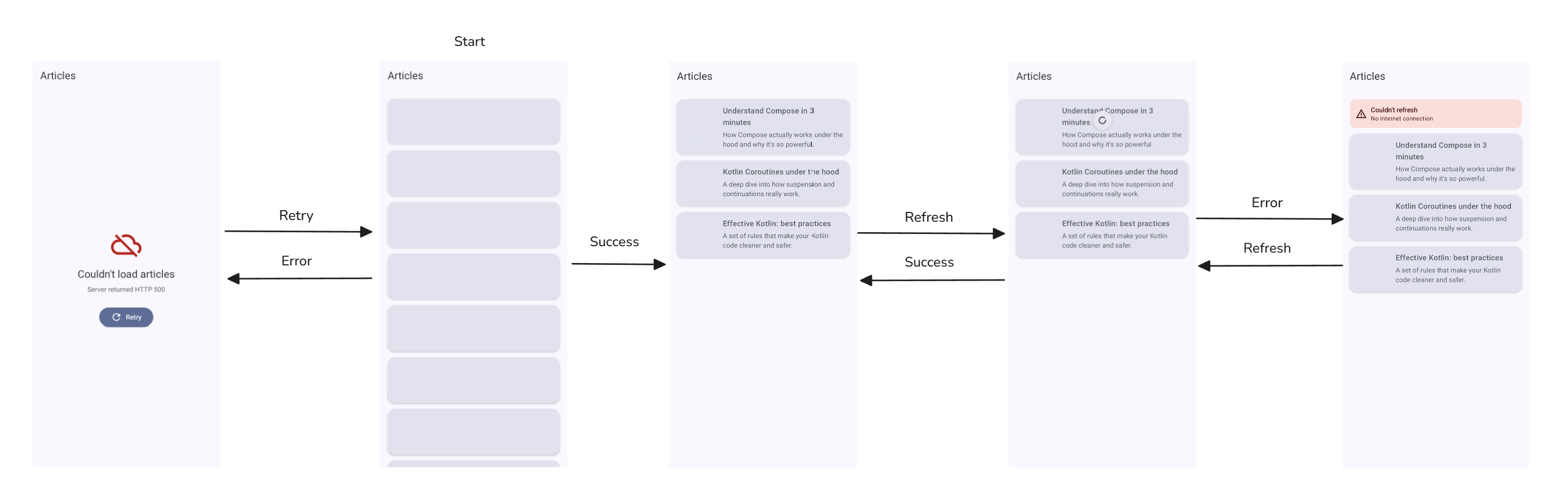
There is also one more case to consider: empty list screen. If we display it as a list, support pull-to-refresh. If we make a dedicated screen for that, a "Refresh" button is more appropriate. This button can move back to initial loader, as we loose no data in this state, or we can show some loader on this screen.
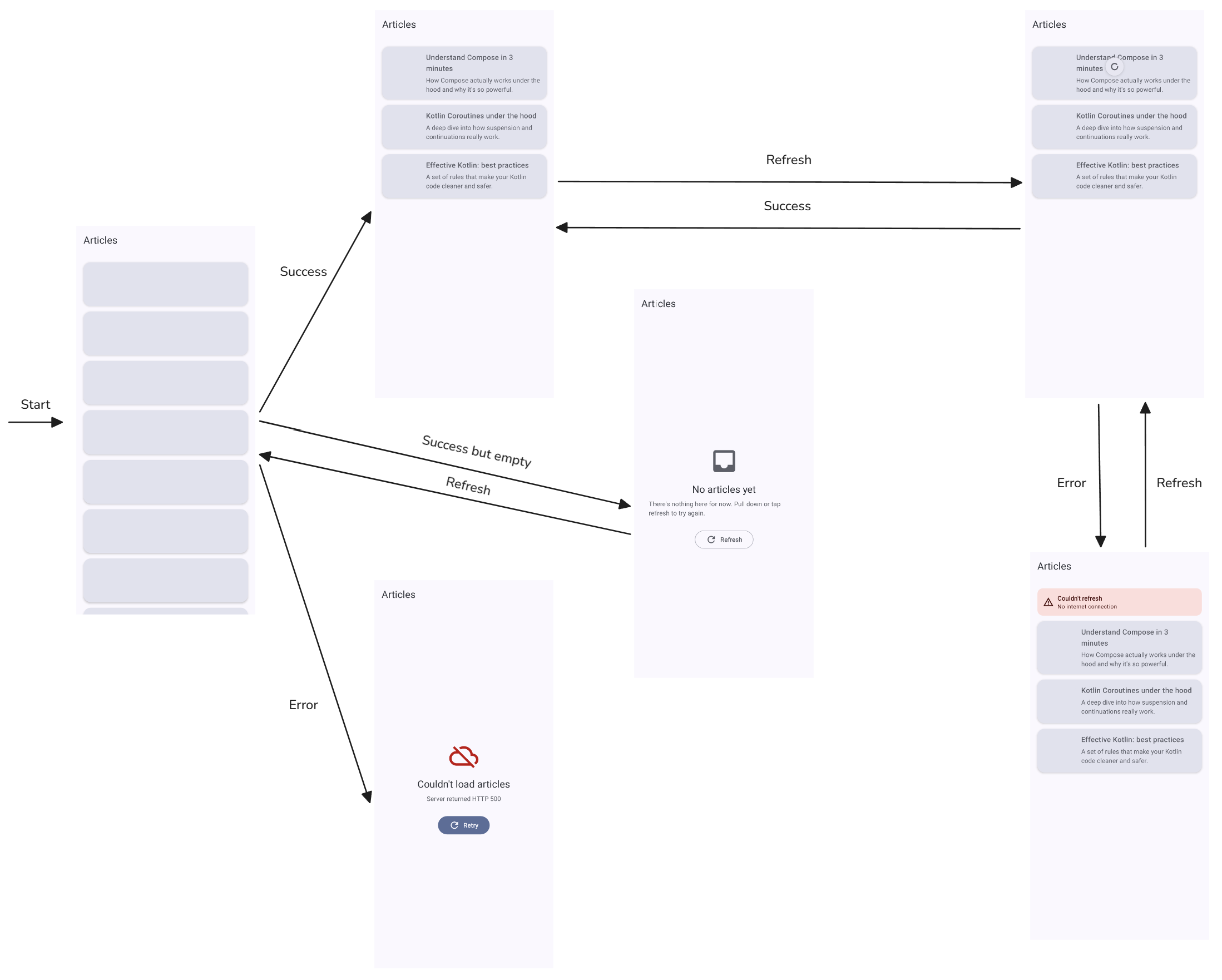
Now how do we implement it? Let's start with screen-state representation. We can represent different states with a sealed interface:
sealed interface ArticlesUiState {
    data object Loading : ArticlesUiState

    data class Error(val message: String) : ArticlesUiState

    data object Empty : ArticlesUiState

    data class Content(
        val articles: ImmutableList<Article>,
        val isRefreshing: Boolean = false,
        val refreshError: String? = null,
    ) : ArticlesUiState
}
If you want to show toast instead of an error tag, you can removerefreshErrorfromContent.
This is how that could be turned into screens:
when (uiState) {
    is ArticlesUiState.Loading -> LoadingSkeleton()

    is ArticlesUiState.Error -> ErrorScreen(
        message = uiState.message,
        onRetry = onRetry,
    )

    ArticlesUiState.Empty -> EmptyScreen(
        onRefresh = onRefresh
    )

    is ArticlesUiState.Content -> ArticlesList(
            isRefreshing = uiState.isRefreshing,
            onRefresh = onRefresh,
            articles = uiState.articles,
            refreshError = uiState.refreshError,
        )
}
We can also use a flat data class:
data class ArticlesUiState(
    val isLoading: Boolean = false,
    val errorMessage: String? = null,
    val articles: ImmutableList<Article>? = null,
) {
    val isInitialLoading get() = isLoading && articles == null
    val isError get() = errorMessage != null && articles == null
    val isRefreshing get() = isLoading && articles == null
    val isEmpty get() = articles != null && articles.isEmpty()
}
This is how that could be turned into screens:
when (uiState) {
    uiState.isInitialLoading -> LoadingSkeleton()

    uiState.isError -> ErrorScreen(
        message = uiState.message,
        onRetry = onRetry,
    )

    uiState.isEmpty -> EmptyScreen(
        onRefresh = onRefresh
    )

    else -> ArticlesList(
        isRefreshing = uiState.isRefreshing,
        onRefresh = onRefresh,
        articles = uiState.articles,
        refreshError = uiState.refreshError,
    )
}
Now view model representation. We can implement it directly:
class ArticlesViewModel(
    private val scope: CoroutineScope,
    private val repository: ArticlesRepository = KtAcademyArticlesRepository(),
) {
    var uiState by mutableStateOf<ArticlesUiState>(ArticlesUiState.Loading)
        private set

    init {
        fetch()
    }

    fun refresh() {
        uiState = when (val current = uiState) {
            is ArticlesUiState.Content -> current.copy(isRefreshing = true, refreshError = null)
            else -> ArticlesUiState.Loading
        }
        fetch()
    }

    private fun fetch() {
        scope.launch {
            runCatching { repository.getArticles() }
                .onSuccess { articles ->
                    uiState = if (articles.isEmpty()) {
                        ArticlesUiState.Empty()
                    } else {
                        ArticlesUiState.Content(articles.toImmutableList())
                    }
                }
                .onFailure { throwable ->
                    val message = throwable.message ?: "Something went wrong"
                    uiState = when (val current = uiState) {
                        is ArticlesUiState.Content -> {
                            current.copy(isRefreshing = false, refreshError = message)
                        }
                        else -> ArticlesUiState.Error(message)
                    }
                }
        }
    }
}
Pull-to-refresh should be present on every screen in your application that loads data, so it should be quite common. So extracting this logic can be helpful.
In most applications I worked on, we had some larger architectures that allowed extraction of this mechanism to be automatic. I do not want to introduce it here, so I will present you a simple wrapper over loadable state.
/**
 * Generic loading state for data that can be fetched once and later refreshed.
 *
 * [Loading] is the initial fetch, [Error] means the initial fetch failed with no
 * data to show, and [Loaded] holds the currently available data together with
 * refresh progress and a possible refresh error.
 */
sealed interface FetchingState<out T> {
    data object Loading : FetchingState<Nothing>
    data class Error(val message: String) : FetchingState<Nothing>
    data class Loaded<T>(
        val data: T,
        val isRefreshing: Boolean = false,
        val refreshingError: String? = null,
    ) : FetchingState<T>
}

/**
 * Reusable helper that fetches a value once on creation and can later refresh it
 * while keeping the previously loaded data visible.
 *
 * The behaviour is intentionally framework-agnostic: it exposes its progress as a
 * [StateFlow] of [FetchingState] and runs all work on the provided [scope].
 */
class RefreshableDataFetcher<T>(
    private val fetch: suspend () -> T,
    private val scope: CoroutineScope,
) {
    private val _state = MutableStateFlow<FetchingState<T>>(FetchingState.Loading)
    val state: StateFlow<FetchingState<T>> = _state.asStateFlow()

    init {
        load()
    }

    /** Performs the initial (full-screen) load, discarding any previous data. */
    fun load() {
        _state.value = FetchingState.Loading
        scope.launch {
            runCatching { fetch() }
                .onSuccess { _state.value = FetchingState.Loaded(it) }
                .onFailure { _state.value = FetchingState.Error(it.message ?: "Something went wrong") }
        }
    }

    /**
     * Re-fetches the data. If data is already loaded it stays visible while the
     * refresh runs, and a failure is reported via [FetchingState.Loaded.refreshingError]
     * instead of replacing the content with a full-screen error.
     */
    fun refresh() {
        when (val current = _state.value) {
            is FetchingState.Loaded -> {
                _state.value = current.copy(isRefreshing = true, refreshingError = null)
                scope.launch {
                    runCatching { fetch() }
                        .onSuccess { _state.value = FetchingState.Loaded(it) }
                        .onFailure {
                            _state.value = current.copy(
                                isRefreshing = false,
                                refreshingError = it.message ?: "Something went wrong",
                            )
                        }
                }
            }

            else -> load()
        }
    }
}
Here is the simplest usage on a view model:
class ArticlesViewModel(
    private val scope: CoroutineScope,
    private val repository: ArticlesRepository,
) {
    private val articles = RefreshableDataFetcher(
        fetch = { repository.getArticles() },
        scope = scope,
    )
    val articlesState = articles.state
    fun refresh() = articles.refresh()
}
With turning into a UI state object:
class ArticlesViewModel(
    private val scope: CoroutineScope,
    private val repository: ArticlesRepository,
) {
    private val articles = RefreshableDataFetcher(
        fetch = { repository.getArticles() },
        scope = scope,
    )
    val uiState = articles.state.map { it.toArticlesUiState() }

    fun refresh() = articles.refresh()

    private fun FetchingState<List<Article>>.toArticlesUiState(): ArticlesUiState = when (this) {
        is FetchingState.Loading -> ArticlesUiState.Loading
        is FetchingState.Error -> ArticlesUiState.Error(message)
        is FetchingState.Loaded -> if (data.isEmpty()) {
            ArticlesUiState.Empty(isRefreshing = isRefreshing)
        } else {
            ArticlesUiState.Content(
                articles = data.toImmutableList(),
                isRefreshing = isRefreshing,
                refreshError = refreshingError,
            )
        }
    }
}
If you need to merge multiple requests, either pack them into one request (if they are all needed and refreshed together) or merge them with
combine.class FetchArticlesUseCase( private val repository: ArticlesRepository, ) { suspend operator fun invoke() = coroutineScope { val articles = async { repository.fetchArticles() } val authors = async { repository.fetchAuthors() } buildArticlesWithAuthors(articles.await(), authors.await()) } } class ArticlesViewModel( private val scope: CoroutineScope, private val fetchArticlesUseCase: FetchArticlesUseCase, ) { private val articles = RefreshableDataFetcher( fetch = fetchArticlesUseCase::invoke, scope = scope, ) val articlesState = articles.state fun refresh() = articles.refresh() }
class ArticlesViewModel(
    private val scope: CoroutineScope,
    private val repository: ArticlesRepository,
) {
    private val articlesSource1 = RefreshableDataFetcher(
        fetch = { repository.fetchSource1 },
        scope = scope,
    )
    private val articlesSource2 = RefreshableDataFetcher(
        fetch = { repository.fetchSource1 },
        scope = scope,
    )
    val articles = articlesSource1.combine(articlesSource2) { articles1, articles2 ->
        (articles1 + articles2).sortedByDescending { it.publicationDate }
    }
    fun refresh() {
        articlesSource1.refresh()
        articlesSource2.refresh()
    }
}
