

One of the most misunderstood topics in Compose is stability. I sadly observe as most articles get it wrong, and most developers operate on outdated knowledge. Yet stability is an important concept, and with this article, I hope to shed some light on it.
This article took some parts from the course Advanced Compose I am currently working on. This course dives deep into Compose topics that are important yet often misunderstood by Compose developers.
Let's start with the history. All declarative UI frameworks, and this category includes Compose, React, SwiftUI, and others, have a problem with mutable objects. Recomposition is triggered and propagated based on state changes. Modifying a mutable object does not trigger recomposition, so the UI can get out of sync with the underlying data.
import androidx.compose.animation.*
import androidx.compose.animation.core.*
import androidx.compose.foundation.*
import androidx.compose.foundation.layout.*
import androidx.compose.foundation.text.*
import androidx.compose.material3.*
import androidx.compose.runtime.*
import androidx.compose.runtime.saveable.*
import androidx.compose.runtime.snapshots.*
import androidx.compose.ui.*
import androidx.compose.ui.draw.*
import androidx.compose.ui.input.pointer.*
import androidx.compose.ui.unit.*
import androidx.compose.ui.window.*
import androidx.compose.ui.geometry.*
import androidx.compose.ui.graphics.*
import androidx.compose.ui.graphics.vector.*
import androidx.compose.ui.graphics.drawscope.*
import androidx.compose.ui.semantics.*
import androidx.compose.ui.text.font.*
import androidx.compose.ui.text.style.*
import androidx.compose.ui.text.input.*
import androidx.compose.ui.layout.*
import androidx.compose.ui.platform.*
import androidx.compose.ui.node.*
import androidx.compose.ui.text.*
import androidx.compose.foundation.lazy.grid.*
import androidx.compose.foundation.selection.*
import androidx.compose.foundation.shape.*
import androidx.compose.foundation.gestures.*
import androidx.compose.foundation.lazy.*
import androidx.compose.foundation.interaction.*
import androidx.lifecycle.compose.*
import kotlinx.browser.document
import kotlinx.coroutines.*
import kotlinx.coroutines.flow.*
import kotlin.math.*

//sampleStart
@Preview
@Composable
fun MutableListSample() {
    val list by remember { mutableStateOf(mutableListOf<String>()) }

    Column {
        // Button click will do nothing visible, because it will not trigger recomposition
        Button(onClick = { list.add("Item${list.size}") }) {
            Text("Add Item")
        }
        Column {
            list.forEach {
                Text(it)
            }
        }
    }
}
//sampleEnd

@OptIn(ExperimentalComposeUiApi::class)
fun main() {
    ComposeViewport(document.body!!) {
        Box(modifier = Modifier.size(300.dp, 600.dp)) {
            MutableListSample()
        }
    }
}

annotation class Preview
There is no simple solution to this problem, and no framework managed to solve this limitation completely. The common advice is to avoid passing mutable objects down the tree and instead pass immutable data.
However, in Compose, it is not mutability that is problematic. Snapshot state (
State) is mutable, but yet it is perfectly safe to pass it down, because Compose can observe changes to it. Function types might also be mutable (lambdas can capture mutable variables), but since they are typically used to read snapshot state, they are also considered safe to pass down. Finally, we have state objects, like LazyListState, ScrollState or MyCustomState, which are mutable, but they are backed by snapshot state internally, so they are also safe to pass down. Such types are mutable, yet perfectly safe to pass down in Compose, so they form a separate category called stable types.@Stable class MyCustomState { var value1 by mutableStateOf(0) var value2 by mutableStateOf("ABCD") }
That leads us to three categories of types in Compose:
- Immutable types:
String,Int,PersistentList… - which are always safe to pass down. - Stable types:
State<T>, function types, state objects… - which are mutable, but also safe to pass down. - Unstable types: mutable classes, lists, view models… - which are mutable and generally unsafe to pass down, however most of them can be observed in a stable way (for example, by collecting
StateFlowtoStateusingcollectAsStateWithLifecycle).
Only the third category is problematic, Compose creators recommend avoiding passing such types down the tree directly. If possible, they should be observed in a stable way, and only stable/immutable data should be passed down.
Compose creators made a design decision that unstable types should be treated differently. Originally, unstable types were treated like they are always changed (even if they are the same instance). This approach was very conservative but didn't help a lot with mutable types, while it led to a lot of unnecessary recompositions. It made our community scared of passing anything that is unstable, and in my opinion, caused more harm than good. So Compose introduced Strong Skipping Mode, which made this behavior less conservative. This mode if enabled by default since Kotlin 2.0.20, so I assume now it is used in the vast majority of projects.
Since Strong Skipping Mode, the only difference between stable/immutable and unstable types is how Compose checks for changes:
- For stable / immutable parameter types, Compose use equality checks (conceptually
==soequals). - For unstable parameter types, Compose uses reference checks (conceptually
===).
This relates to comparing old and new arguments during recomposition for:
- composable function parameters,
- keys in remember blocks,
- keys in effect blocks.
To understand this decision, let's consider
MutableList used as an argument to a component. If it were compared by ==, developers could think it is safe to pass it down as an argument, because we would compare its content anyway. Our UI would less often be stale, but the correct display would be "accidental". Adding an element to this list with add would not trigger recomposition, so UI would be correct only if something else triggered recomposition. We don't want applications implemented this way! This is why for unstable objects === is used, which gives more predictable results and cheaper comparison (for mutable objects == often has O(n) complexity, while === always has O(1)). The same applies to keys in remember and effect blocks.import androidx.compose.animation.* import androidx.compose.animation.core.* import androidx.compose.foundation.* import androidx.compose.foundation.layout.* import androidx.compose.foundation.text.* import androidx.compose.material3.* import androidx.compose.runtime.* import androidx.compose.runtime.saveable.* import androidx.compose.runtime.snapshots.* import androidx.compose.ui.* import androidx.compose.ui.draw.* import androidx.compose.ui.input.pointer.* import androidx.compose.ui.unit.* import androidx.compose.ui.window.* import androidx.compose.ui.geometry.* import androidx.compose.ui.graphics.* import androidx.compose.ui.graphics.vector.* import androidx.compose.ui.graphics.drawscope.* import androidx.compose.ui.semantics.* import androidx.compose.ui.text.font.* import androidx.compose.ui.text.style.* import androidx.compose.ui.text.input.* import androidx.compose.ui.layout.* import androidx.compose.ui.platform.* import androidx.compose.ui.node.* import androidx.compose.ui.text.* import androidx.compose.foundation.lazy.grid.* import androidx.compose.foundation.selection.* import androidx.compose.foundation.shape.* import androidx.compose.foundation.gestures.* import androidx.compose.foundation.lazy.* import androidx.compose.foundation.interaction.* import androidx.lifecycle.compose.* import kotlinx.browser.document import kotlinx.coroutines.* import kotlinx.coroutines.flow.* import kotlin.math.* //sampleStart // Poor practice @Composable fun UserList(users: MutableList<User>) { // ... } //sampleEnd
When we discuss Strong Skipping Mode, it is worth mentioning one more change it introduced, that was missed by most developers: it introduced automatic lambdas memoization. All lambdas used in composable functions are under the hood wrapped in
remember blocks with keys being all captured variables. This means that passing lambdas down the tree is now safe and does not cause unnecessary recompositions, even if they capture unstable variables. (this behavior can be disabled by using the @DontMemoize in front of the lambda you do not want memoized).import androidx.compose.animation.* import androidx.compose.animation.core.* import androidx.compose.foundation.* import androidx.compose.foundation.layout.* import androidx.compose.foundation.text.* import androidx.compose.material3.* import androidx.compose.runtime.* import androidx.compose.runtime.saveable.* import androidx.compose.runtime.snapshots.* import androidx.compose.ui.* import androidx.compose.ui.draw.* import androidx.compose.ui.input.pointer.* import androidx.compose.ui.unit.* import androidx.compose.ui.window.* import androidx.compose.ui.geometry.* import androidx.compose.ui.graphics.* import androidx.compose.ui.graphics.vector.* import androidx.compose.ui.graphics.drawscope.* import androidx.compose.ui.semantics.* import androidx.compose.ui.text.font.* import androidx.compose.ui.text.style.* import androidx.compose.ui.text.input.* import androidx.compose.ui.layout.* import androidx.compose.ui.platform.* import androidx.compose.ui.node.* import androidx.compose.ui.text.* import androidx.compose.foundation.lazy.grid.* import androidx.compose.foundation.selection.* import androidx.compose.foundation.shape.* import androidx.compose.foundation.gestures.* import androidx.compose.foundation.lazy.* import androidx.compose.foundation.interaction.* import androidx.lifecycle.compose.* import kotlinx.browser.document import kotlinx.coroutines.* import kotlinx.coroutines.flow.* import kotlin.math.* //sampleStart @Composable fun MyComposable(unstableObject: Unstable, stableObject: Stable) { val lambda = { use(unstableObject) use(stableObject) } } // Under the hood, this is equivalent to: @Composable fun MyComposable(unstableObject: Unstable, stableObject: Stable) { val lambda = remember(unstableObject, stableObject) { { use(unstableObject) use(stableObject) } } } //sampleEnd
Unstable types should generally be avoided in Compose, even though they are not that problematic since Strong Skipping Mode. So what is stable and what is unstable?
Many Compose developers use plugins that show stability information in the IDE. The most popular one is Compose Stability Analyzer. It displays stability information for parameters, and can display stability report for the whole project. I will use it in below snippets to show stability information.
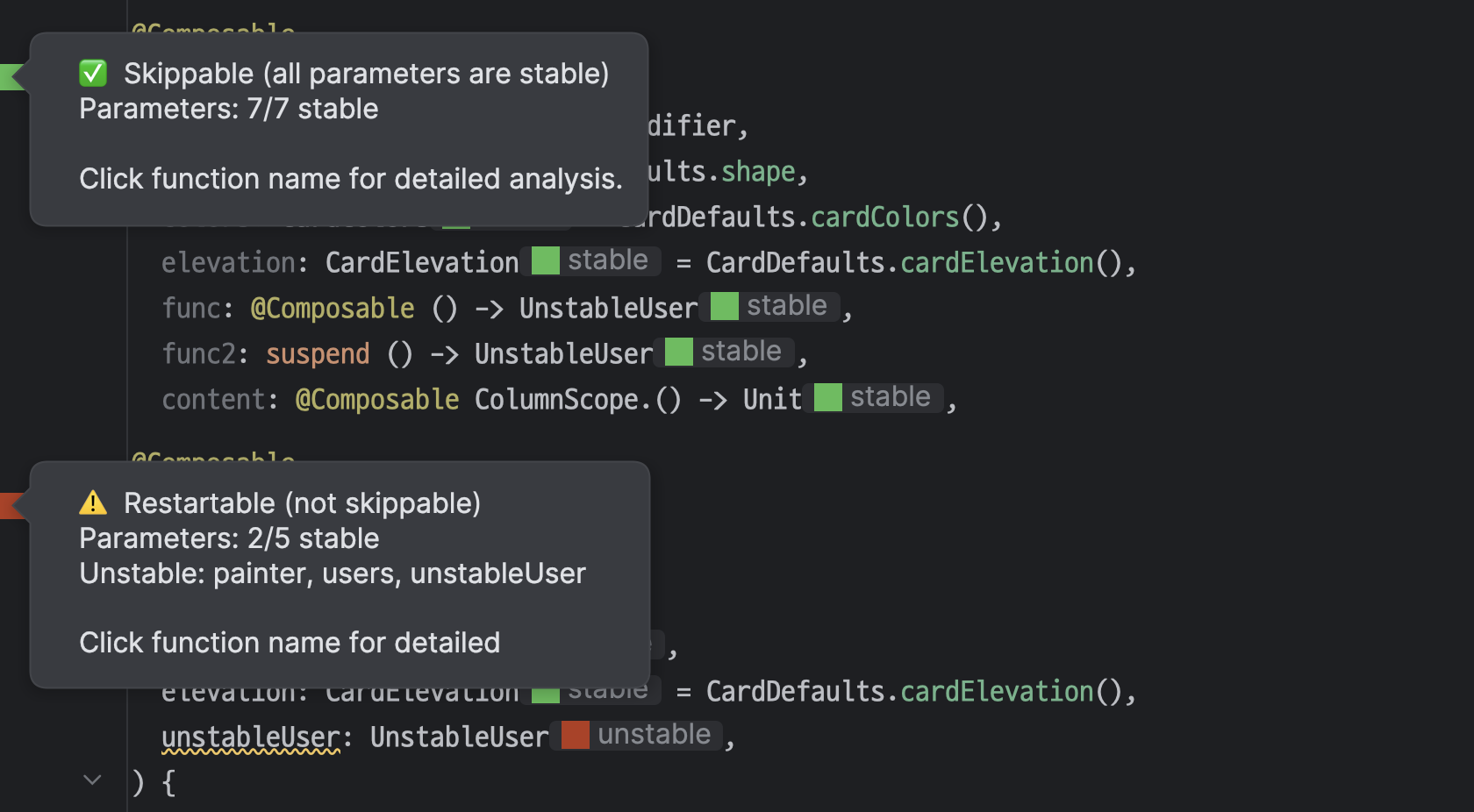
You can also generate a stability report for classes and composable functions used in your project. See instructions. I will show an example of such report later in this lesson.
Let's start from basics. All immutable basic types, like numbers (
Int, Double etc.), strings (String) and booleans (Boolean) are stable.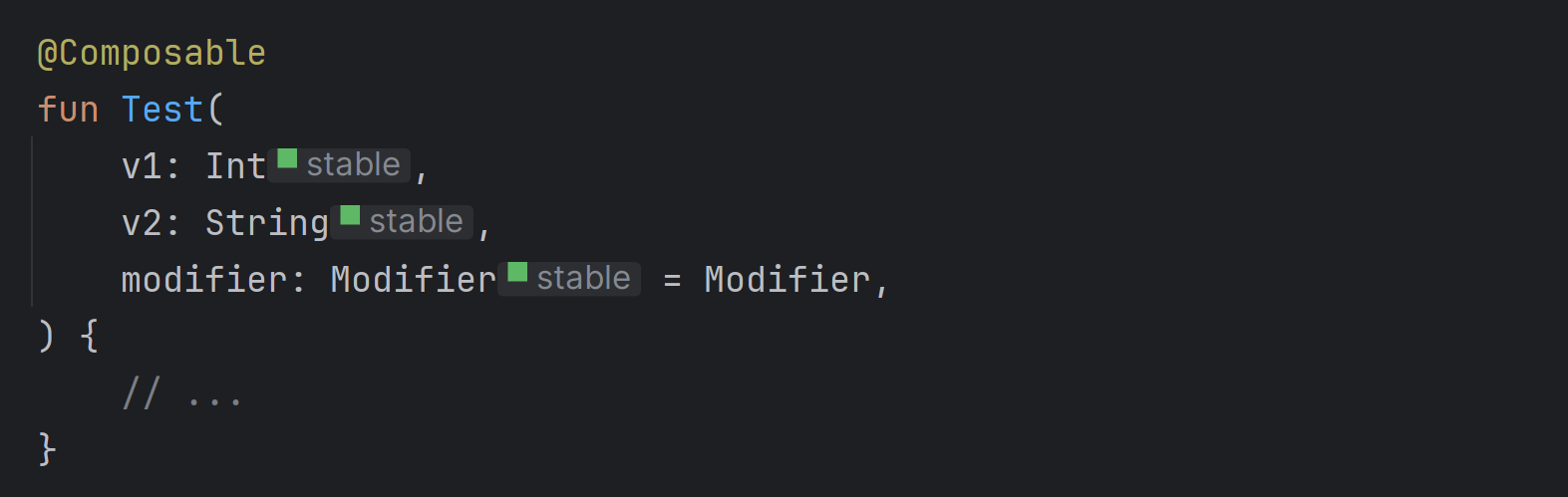
Snapshot state is obviously stable as well, because it triggers all its readers' recomposition whenever its state changes.

However, it is worth mentioning that passing
State as an argument to a composable is a poor practice. It is better to pass either actual value, or a lambda that provides the value. Passing State down the tree exposes implementation details of how state is stored, and makes testing harder.// Poor practice fun UserItem(userState: State<User>) { val user by userState Text(user.name) } // Good practice fun UserItem(user: User) { Text(user.name) } // Good practice fun UserItem(userProvider: () -> User) { Text(userProvider().name) }
If passing a lambda is a good practice, so what is function type stability?
Function types in Compose are always considered stable, no matter what are their parameter or result types. This property can be abused because in theory functions can internally capture or modify mutable state, however, abusing it would be really hard. Functions are automatically memoized in Compose based on local variables they capture. When those variables change, a new function is created and passed. If those variables are unstable, the function will be considered changed anyway. This behavior makes perfect sense. Functions defined outside composable functions are not memoized, but they typically only change. Take a look at the examples below:
import androidx.compose.animation.*
import androidx.compose.animation.core.*
import androidx.compose.foundation.*
import androidx.compose.foundation.layout.*
import androidx.compose.foundation.text.*
import androidx.compose.material3.*
import androidx.compose.runtime.*
import androidx.compose.runtime.saveable.*
import androidx.compose.runtime.snapshots.*
import androidx.compose.ui.*
import androidx.compose.ui.draw.*
import androidx.compose.ui.input.pointer.*
import androidx.compose.ui.unit.*
import androidx.compose.ui.window.*
import androidx.compose.ui.geometry.*
import androidx.compose.ui.graphics.*
import androidx.compose.ui.graphics.vector.*
import androidx.compose.ui.graphics.drawscope.*
import androidx.compose.ui.semantics.*
import androidx.compose.ui.text.font.*
import androidx.compose.ui.text.style.*
import androidx.compose.ui.text.input.*
import androidx.compose.ui.layout.*
import androidx.compose.ui.platform.*
import androidx.compose.ui.node.*
import androidx.compose.ui.text.*
import androidx.compose.foundation.lazy.grid.*
import androidx.compose.foundation.selection.*
import androidx.compose.foundation.shape.*
import androidx.compose.foundation.gestures.*
import androidx.compose.foundation.lazy.*
import androidx.compose.foundation.interaction.*
import androidx.lifecycle.compose.*
import kotlinx.browser.document
import kotlinx.coroutines.*
import kotlinx.coroutines.flow.*
import kotlin.math.*

//sampleStart
@Composable
fun UserManagementScreen(viewModel: MainViewModel = injectViewModel()) {
    val uiState = viewModel.uiState.collectAsStateWithLifecycle()

    UserList(
        uiStateProvider = { uiState.value }, // Changes only if uiState changes (most likely never)
        onUserClick = { viewModel.onUserClick(it) }, // New function only if viewModel changes (most likely never)
        onRefresh = viewModel::onAccept, // Works just like lambda above
    )
}
//sampleEnd

This component will get recomposed only if
viewModel changes, so most likely never. Why? { uiState.value } is remembered with uiState as a key, which is remembered by collectAsStateWithLifecycle and never changes. We would have the same situation if we used property delegation. { viewModel.onUserClick(it) } is remembered with viewModel as a key, which should never change because it is remembered by injectViewModel. The same situation with viewModel::onAccept, which Kotlin treats just like { viewModel.onAccept() }. Let's see one more example:import androidx.compose.animation.* import androidx.compose.animation.core.* import androidx.compose.foundation.* import androidx.compose.foundation.layout.* import androidx.compose.foundation.text.* import androidx.compose.material3.* import androidx.compose.runtime.* import androidx.compose.runtime.saveable.* import androidx.compose.runtime.snapshots.* import androidx.compose.ui.* import androidx.compose.ui.draw.* import androidx.compose.ui.input.pointer.* import androidx.compose.ui.unit.* import androidx.compose.ui.window.* import androidx.compose.ui.geometry.* import androidx.compose.ui.graphics.* import androidx.compose.ui.graphics.vector.* import androidx.compose.ui.graphics.drawscope.* import androidx.compose.ui.semantics.* import androidx.compose.ui.text.font.* import androidx.compose.ui.text.style.* import androidx.compose.ui.text.input.* import androidx.compose.ui.layout.* import androidx.compose.ui.platform.* import androidx.compose.ui.node.* import androidx.compose.ui.text.* import androidx.compose.foundation.lazy.grid.* import androidx.compose.foundation.selection.* import androidx.compose.foundation.shape.* import androidx.compose.foundation.gestures.* import androidx.compose.foundation.lazy.* import androidx.compose.foundation.interaction.* import androidx.lifecycle.compose.* import kotlinx.browser.document import kotlinx.coroutines.* import kotlinx.coroutines.flow.* import kotlin.math.* //sampleStart @Composable fun UserItem( user: User, onUserClicked: (User) -> Unit, ) { Row { Text(user.name) Button(onClick = { onUserClicked(user) }) { Text("Click me") } } } //sampleEnd
In the above example
Button will be recomposed with new onClick every time User changes. It should be, without that it could call a function with stale user. This works automatically, because { onUserClicked(user) } is remembered with both onUserClicked and user as keys, so user change means new lambda, which means Button recomposition with new onClick (different object, so different reference, so == returns false, so recomposition propagates to the Button).Collections are problematic in Compose. In Kotlin types like
List, Set or Map are read-only types, which means they only allow reading values, but it doesn't mean that underlying collection is actually immutable. MutableList implements List, MutableSet implements Set, and MutableMap implements Map. This is why those types are unstable.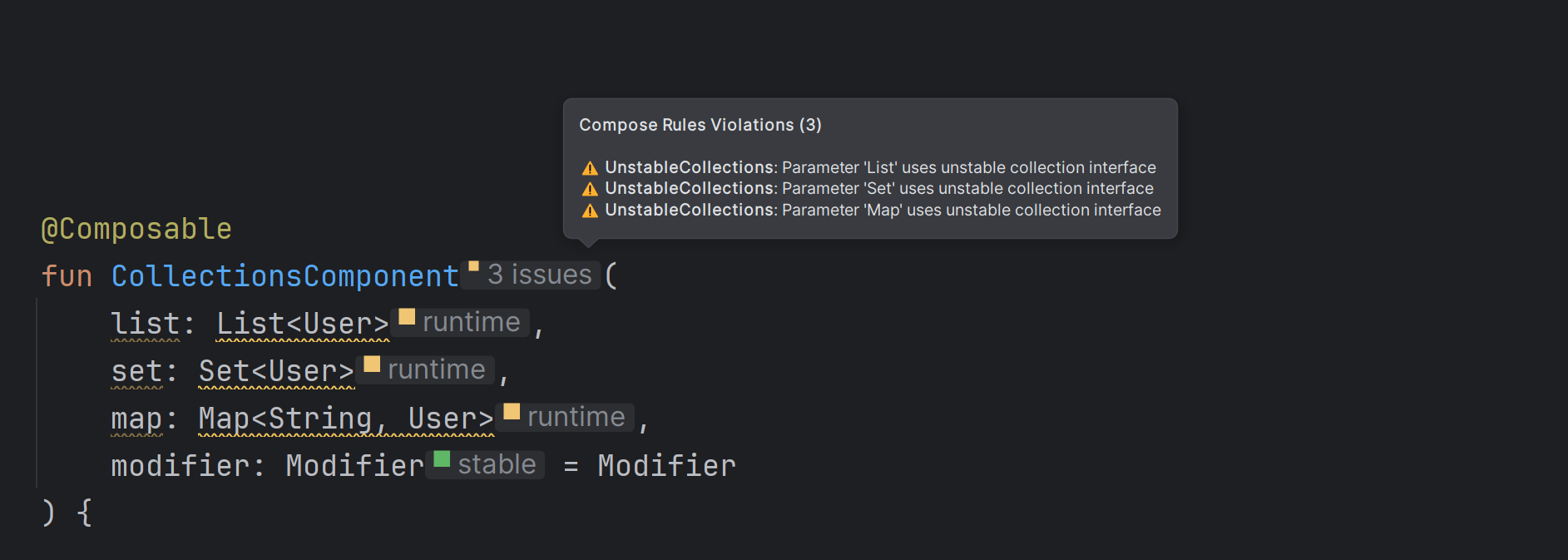
The simplest and the most common workaround is to use persistent collections from
kotlinx.collections.immutable library, like PersistentList, PersistentSet or PersistentMap. Those types are truly immutable, so they are stable in Compose.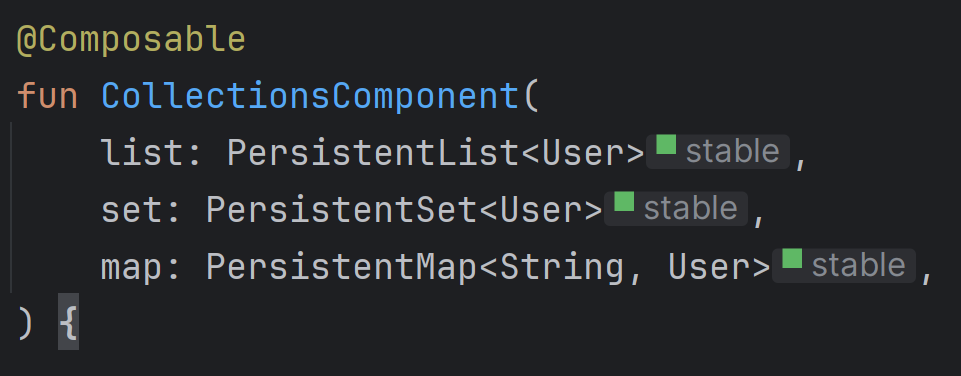
However, if you are sure that in your project all
List, Set and Map are never changed after they are passed to composable functions, you can force Compose to treat them as stable. This can achieved by setting up stability configuration in your project.composeCompiler { stabilityConfigurationFiles = listOf(rootProject.layout.projectDirectory.file("stability_config.conf")) }
Inside it, you can specify what types should be considered stable. Use fully qualified names. In some projects I could see collections set as stable. Some also set date time as stable (this is a less common practice, as we generally prefer to specify formatting in view models and pass strings to UI).
// Consider collections stable
kotlin.collections.List
kotlin.collections.Set
kotlin.collections.Map
// Consider LocalDateTime stable
java.time.LocalDateTime
Compose compiler analyzes classes and their properties to determine their stability. A class is considered stable if all its properties are read-only and stable. This is a typical example of a stable class:
class MultipleAnswerQuestionUi(
    val question: String,
    val answers: PersistentList<AnswerUi>,
)

class AnswerUi(
    val text: String,
    val isSelected: Boolean,
    val isCorrect: Boolean,
)
AnswerUi is stable, because it only has val properties with stable types. This means MultipleAnswerQuestionUi is also stable, because it also only has val properties with stable types. Mutable state holders are also stable for as long as they are backed strictly by stable types, so typically snapshot state.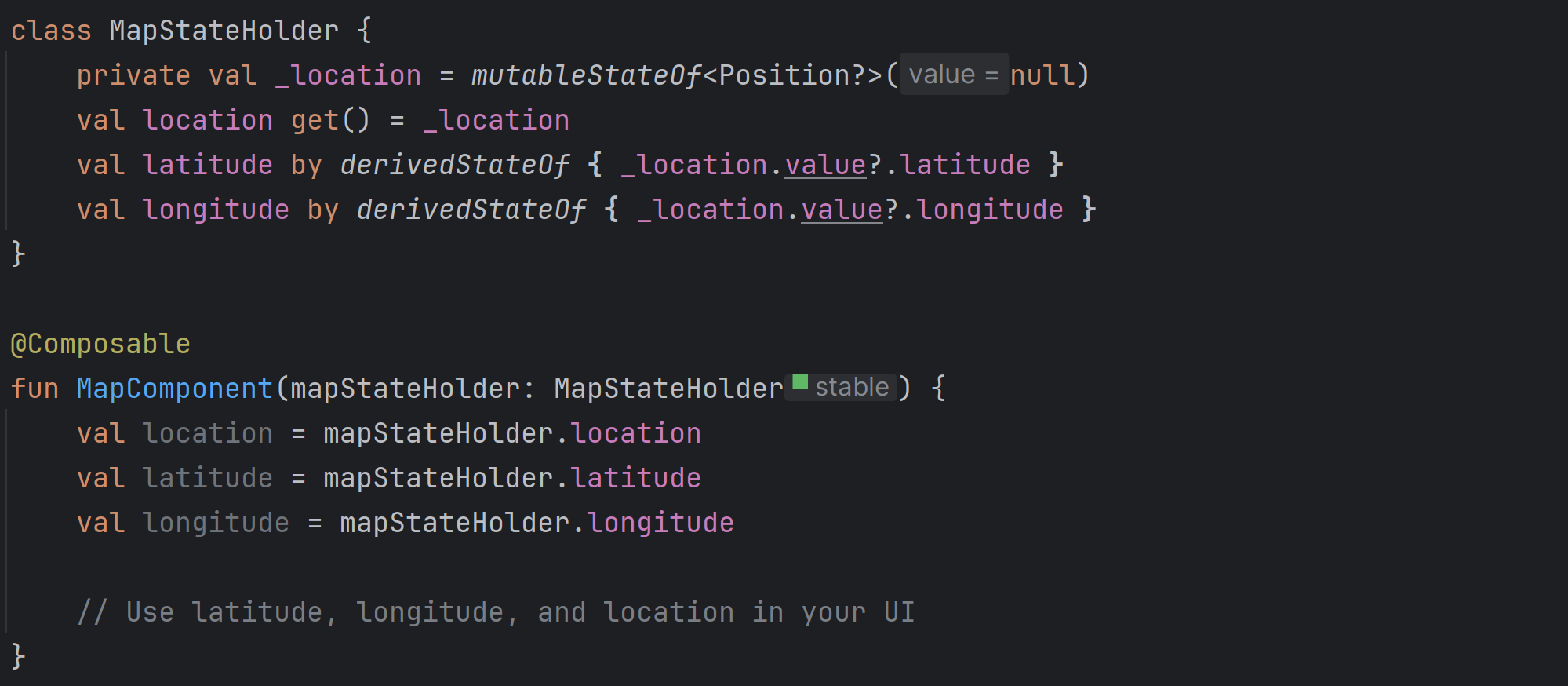
Even single
var or unstable property makes class unstable. No matter if this property is public or not.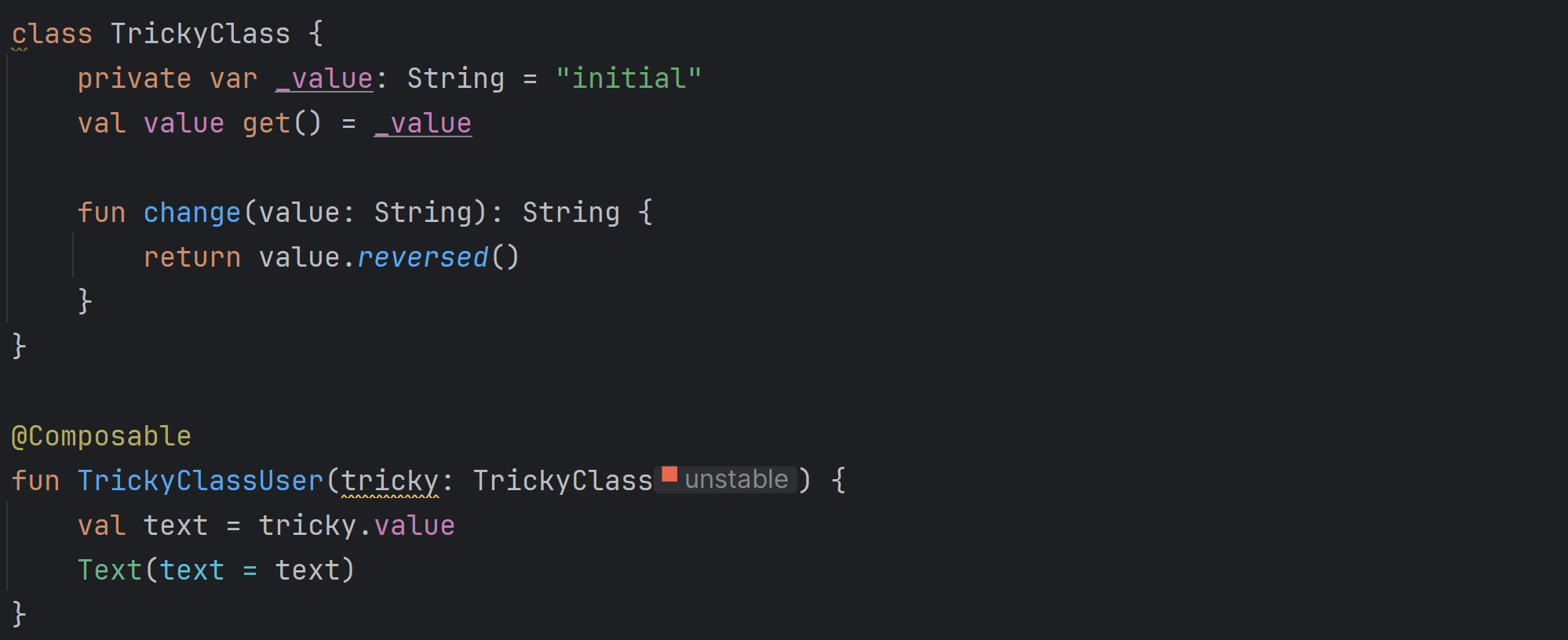
Sometimes you might be unsure about specific class stability. Here comes a compiler report for the help. It only requires setting report destination in
composeCompiler block on build.gradle(.kts). We typically set it to src/build/compose_compiler folder.composeCompiler { reportsDestination = layout.buildDirectory.dir("compose_compiler") metricsDestination = layout.buildDirectory.dir("compose_compiler") }
After starting the build, you can find the report in
src/build/compose_compiler folder. It will contain information about stability of all classes used in your Compose code. After starting your project, you should see a reports showing stability of all classes and composanles used in your code. Let's take this class as an example. Why is it unstable?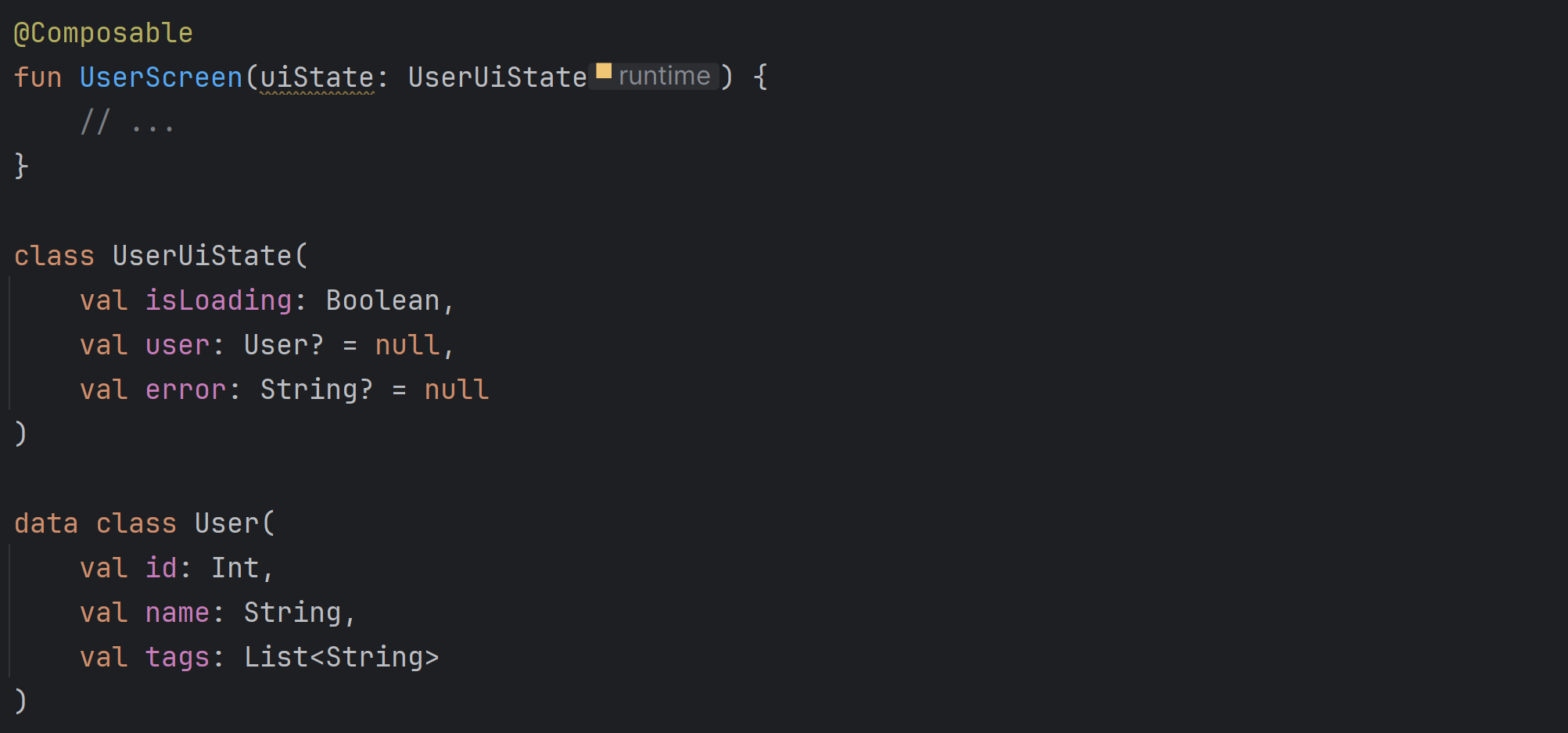
After generating reports, I could see the following:
// In app_release-composables.txt
restartable skippable fun UserScreen(
  unused unstable uiState: UserUiState
)

// In app_release-classes.txt
unstable class UserUiState {
  stable val isLoading: Boolean
  unstable val user: User?
  stable val error: String?
  <runtime stability> = Unstable
}
unstable class User {
  stable val id: Int
  stable val name: String
  unstable val tags: List<String>
  <runtime stability> = Unstable
}
Now I can clearly see that
UserUiState is unstable only because User is unstable, and User is unstable because it has an unstable property tags of type List<String>. Changing List to PersistentList would make both classes stable.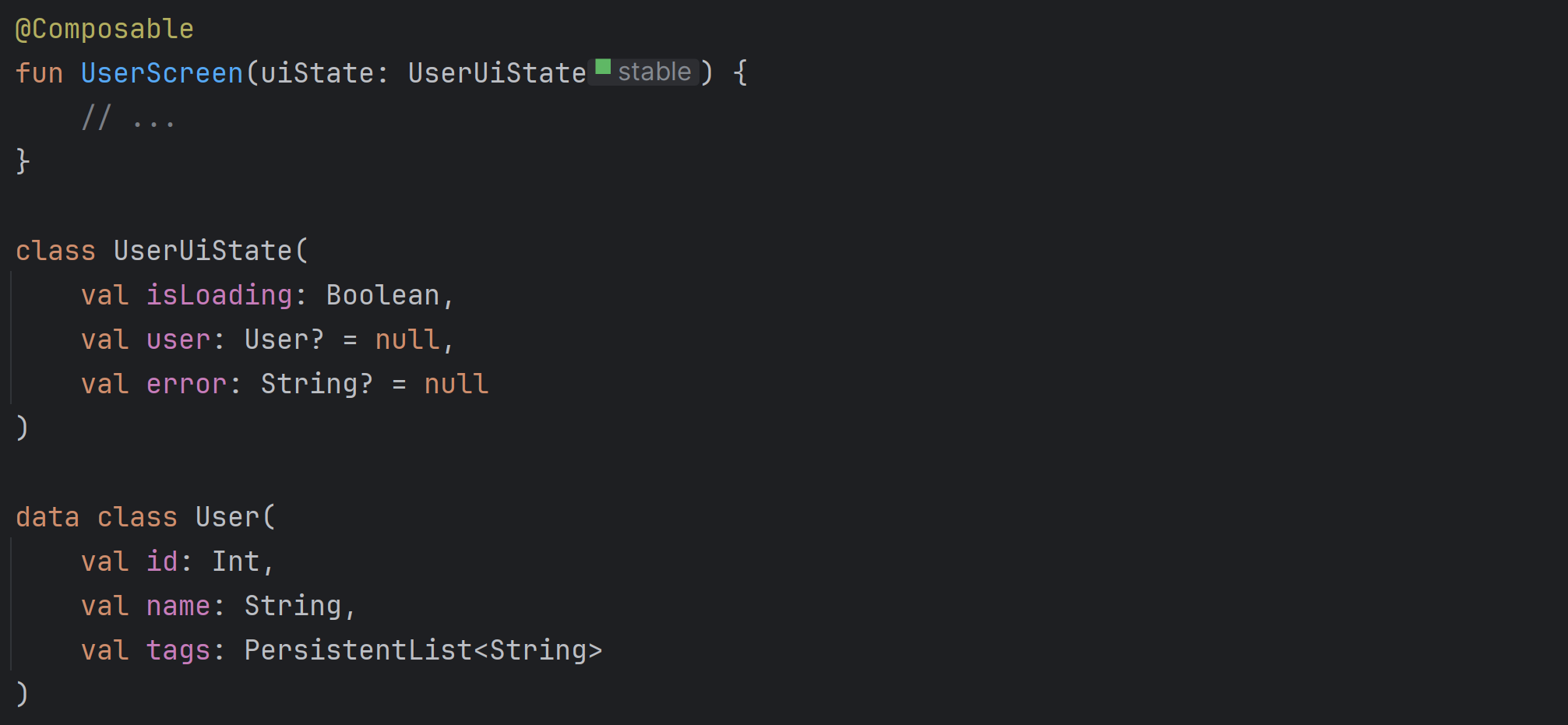
For every class, you can enforce its stability by annotating it with
@Immutable or @Stable annotation. Strickly speaking @Immutable is for classes that never change, and @Stable is for possibly mutable classes that are stable. For example, a class backed by snapshot state can be annotated with @Stable, but it shouldn't be annotated with @Immutable. In pracice, there is no difference at the moment between what those two annotations do, they both enforce Compose compiler to consider a specific class stable.Since Compose compiler cannot determine interface stability, all interfaces are by default considered unstable. One exception is interfaces with single abstract method (SAM interfaces), which are considered stable because they are treated like function types. This is why
Comparator is considered stable at runtime.- Type stability (since String Skipping Mode) decides how objects are compared when Compose decides it should recompose composable, recalculate remember block or recall side effect. Stable types are compared with
==and unstable with===. - It is recommended to use stable types in Compose. Unstable type in a complex class can cause lots of unnecessary recompositions, leading to performance issues.
String,Int(and other number),Boolean,State<T>and function types are stable.List,Map,Setand mutable classes are unstable.PersistentList,PersistentMap,PersistentSetare stable.- Stability can be tracked with Compose Stability Analyzer or stability report. We can also enforce it with annotations
@Stableand@Immutableor with stability configuration.
