
As we have mentioned already, coroutines are components that can be suspended and resumed. This might sound like threads, but it's very different because threads cannot be suspended, only blocked. When a thread is blocked, it still consumes resources and needs to be managed by the operating system. When a coroutine is suspended, the only thing that remains is an object that keeps references to local variables and the place where this coroutine was suspended. Coroutines are lightweight abstractions that run on top of threads, and they are managed by the coroutine library, not by the operating system.
There is a metaphor I like using to explain the difference between threads and coroutines. Imagine a game. A thread is like an old-school game you can't save. If you want to take a break for a while, you need to leave the game paused. A coroutine is like a modern game that you can save at any time; thus, you can take a break whenever you want without wasting resources, but you can also play multiple games concurrently because you can save one game and start another, even on a different computer. This is important because if you play games at internet cafés, you can take any available computer and resume your game from where you left off. These are the main benefits of coroutines. Thanks to the suspension mechanism, they can be saved and resumed at any time on any thread. So, we can suspend them at minimal cost, we can run multiple coroutines concurrently on a single thread, and we can efficiently manage threads because coroutines are not strictly bound to a particular thread. We will see these benefits throughout the book, but let's see how suspension works first.
When we transform an application from blocking threads to suspending coroutines, the single most important change is the use of the
suspend modifier in front of many functions. Such functions are called suspending functions, and they are the hallmark of Kotlin coroutines. Here is a simple example of a backend application using coroutines. Notice that the only difference between using coroutines and blocking threads is the suspend modifier.class GithubApi { @GET("orgs/{organization}/repos?per_page=100") suspend fun getOrganizationRepos( @Path("organization") organization: String ): List<Repo> } class GithubConnectorService( private val githubApi: GithubApi ) { suspend fun getKotlinRepos() = githubApi.getOrganizationRepos("kotlin") .map { it.toDomain() } } @Controller class UserController( private val githubConnectorService: GithubConnectorService, ) { @GetMapping("/kotlin/repos") suspend fun findUser(): GithubReposResponseJson = githubConnectorService.getKotlinRepos().toJson() }
So, what are suspending functions? Do they start coroutines? No, they don't! Suspending functions are just functions that can suspend a coroutine. This means that a suspending function must be called on a coroutine (because this function needs a coroutine to suspend). In practice, suspend functions must be called by other suspending functions or by coroutine builders that start coroutines. Of course, a suspending function can also call regular functions.
Suspending functions are not coroutines, but they require coroutines. This is why a framework like Spring Boot reacts to the
suspend modifier in controller functions and calls suspending functions on a coroutine. On the other hand, suspending functions allow suspension, so network libraries like Retrofit1 react to the suspend modifier and suspend coroutines (instead of blocking threads) when they need to wait for a network response.So, let's see it in action. For this, we need a coroutine. The simplest way to start one is to use a suspending
main function. Such a function is wrapped by the Kotlin compiler and started in a coroutine. However, if we call another suspending function from main, this function will be called on the same coroutine. You can say that suspend functions are synchronized, but the simplest explanation is that they are not coroutines themselves; they can just suspend coroutines.import kotlinx.coroutines.* // Suspending function can suspend a coroutine suspend fun a() { // Suspends the coroutine for 1 second delay(1000) println("A") } // Suspending main is started by Kotlin in a coroutine suspend fun main() { println("Before") a() println("After") } // Before // (1 second delay) // A // After
Notice that if we had similar code in JavaScript but using async functions instead of suspending functions, the result would be "Before", "After", a 1-second delay, and then "A". This is because async functions in JavaScript are coroutines, and they always start asynchronous processes. Suspending functions are not coroutines; they are functions that can suspend coroutines. These two concepts should not be confused.
What will happen if we suspend in the middle of our
main function? For this, we can use the suspendCancellableCoroutine.import kotlinx.coroutines.* //sampleStart suspend fun main() { println("Before") suspendCancellableCoroutine<Unit> { } println("After") } // Before //sampleEnd
suspendCancellableCoroutineis a function from the kotlinx.coroutines library. Instead, we could use thesuspendCoroutinefunction from Kotlin standard library, which would behave the same in all examples in this chapter. I decided to usesuspendCancellableCoroutinebecause it is generally good practice to choose it as it supports cancellation and is more testable.
If you call the above code, you will not see "After", and the code will not stop running (because our
main function never finished). The coroutine is suspended after "Before". Our game has been stopped and never resumed. So, how can we resume?Take a look again at the
suspendCancellableCoroutine invocation and notice that it ends with a lambda expression ({ }). The function passed as an argument will be invoked before the suspension. This function has an argument of type Continuation. This is the object that we can use to resume the coroutine. We could use it to resume immediately2:import kotlinx.coroutines.* import kotlin.coroutines.resume //sampleStart suspend fun main() { println("Before") suspendCancellableCoroutine<Unit> { continuation -> println("Before too") continuation.resume(Unit) } println("After") } // Before // Before too // After //sampleEnd
suspendCancellableCoroutine calls the lambda expression immediately, just like the let, apply, or useLines functions. This is necessary so that the continuation can be used just before the suspension. Calling the lambda expression after the suspendCancellableCoroutine call would be too late. So, the lambda expression passed as a parameter to the suspendCancellableCoroutine function is invoked just before the suspension. This lambda is used to store this continuation somewhere or to plan whether to resume it.Since Kotlin 1.3, the definition ofContinuationhas been changed. Instead ofresumeandresumeWithException, there is oneresumeWithfunction that expectsResult. TheresumeandresumeWithExceptionfunctions we are using are extension functions of the standard library that useresumeWith.
inline fun <T> Continuation<T>.resume(value: T): Unit =
    resumeWith(Result.success(value))

inline fun <T> Continuation<T>.resumeWithException(
    exception: Throwable
): Unit = resumeWith(Result.failure(exception))
The continuation is an object that stores the state of the coroutine. It must also store the local variables and the place where the coroutine was suspended. We will see how it actually works in the next chapter, but for now let's discuss what it contains. Consider the following code:
import kotlinx.coroutines.delay
import kotlinx.coroutines.suspendCancellableCoroutine
import kotlin.coroutines.resume

suspend fun a() {
    val a = "ABC"
    suspendCancellableCoroutine<Unit> { continuation ->
        // What is stored in the continuation?
        continuation.resume(Unit)
    }
    println(a)
}

suspend fun main() {
    val list = listOf(1, 2, 3)
    val text = "Some text"
    println(text)
    delay(1000)
    a()
    println(list)
}
What do you expect to be stored in the continuation? It must be the state of the coroutine that is started by Kotlin to execute the suspending
main function. So, this state must contain references to not only the local variables of the a function but also to the local variables of the main function - at least those used after the suspension. This is the only way to make it possible to resume the coroutine and continue from the point where it was suspended. So, the continuation must contain references to the values of the list and a variables. It must also keep the place where the coroutine was suspended, which means label 1 for function a, and label 2 for function main (because delay takes label 1). These are the essentials of explaining what a continuation is and how it works. The details are presented in the next chapter.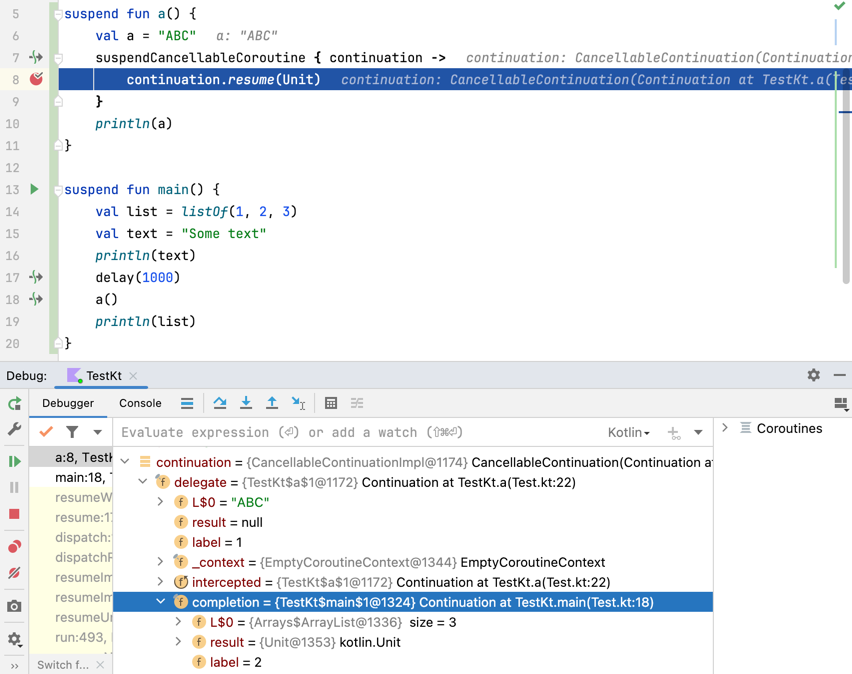
How can we suspend a coroutine for some time? The naive approach would be to start a thread that will resume the continuation after a defined period. This is possible:
import kotlin.concurrent.thread
import kotlinx.coroutines.*
import kotlin.coroutines.resume

//sampleStart
suspend fun main() {
    println("Before")

    suspendCancellableCoroutine<Unit> { continuation ->
        thread {
            println("Suspended")
            Thread.sleep(1000)
            continuation.resume(Unit)
            println("Resumed")
        }
    }

    println("After")
}
// Before
// Suspended
// (1 second delay)
// After
// Resumed
//sampleEnd
Of course, such an approach is not practical because threads are expensive and we should not create them just to suspend a coroutine for a while. However, it is important to note that a continuation can be passed around and resumed from another thread. We can even make a function that will resume our continuation after a defined period. In such a case, the continuation is captured by the lambda expression, as shown in the code snippet below.
import kotlin.concurrent.thread
import kotlinx.coroutines.*
import kotlin.coroutines.*

//sampleStart
fun continueAfterSecond(continuation: Continuation<Unit>) {
    thread {
        Thread.sleep(1000)
        continuation.resume(Unit)
    }
}

suspend fun main() {
    println("Before")

    suspendCancellableCoroutine<Unit> { continuation ->
        continueAfterSecond(continuation)
    }

    println("After")
}
// Before
// (1 sec)
// After
//sampleEnd
Such a mechanism works, but it unnecessarily creates threads that it then ends after just a second of inactivity. Threads are not cheap, so why waste them? A better way would be to set up an "alarm clock". In JVM, we can use
ScheduledExecutorService for this by setting it to call continuation.resume(Unit) after a defined amount of time.import java.util.concurrent.* import kotlinx.coroutines.* import kotlin.coroutines.resume //sampleStart private val executor = Executors.newSingleThreadScheduledExecutor { Thread(it, "scheduler").apply { isDaemon = true } } suspend fun main() { println("Before") suspendCancellableCoroutine<Unit> { continuation -> executor.schedule({ continuation.resume(Unit) }, 1000, TimeUnit.MILLISECONDS) } println("After") } // Before // (1 second delay) // After //sampleEnd
Suspending for a set amount of time seems like a useful feature, so let's extract it into a function that we will name
delay.import java.util.concurrent.* import kotlinx.coroutines.* import kotlin.coroutines.resume //sampleStart private val executor = Executors.newSingleThreadScheduledExecutor { Thread(it, "scheduler").apply { isDaemon = true } } suspend fun delay(timeMillis: Long): Unit = suspendCancellableCoroutine { cont -> executor.schedule({ cont.resume(Unit) }, timeMillis, TimeUnit.MILLISECONDS) } suspend fun main() { println("Before") delay(1000) println("After") } // Before // (1 second delay) // After //sampleEnd
The executor still uses a thread, but it is just one thread for all coroutines using the
delay function. This is much better than blocking one thread every time we need to wait for some time.This is exactly how
delay from the Kotlin Coroutines library is implemented in older versions of this library. The current implementation is more complicated, mainly so it supports testing, but the essential idea remains the same.One thing that might concern you is why we passed
Unit to the resume function. You might also be wondering why we used Unit as a type argument for the suspendCancellableCoroutine. The fact that these two are the same is no coincidence.val ret: Unit = suspendCancellableCoroutine<Unit> { c -> c.resume(Unit) }
When we call
suspendCancellableCoroutine, we can specify which type will be returned in its continuation. The same type needs to be used when we call resume.import kotlinx.coroutines.* import kotlin.coroutines.resume //sampleStart suspend fun main() { val i: Int = suspendCancellableCoroutine<Int> { c -> c.resume(42) } println(i) // 42 val str: String = suspendCancellableCoroutine<String> { c -> c.resume("Some text") } println(str) // Some text val b: Boolean = suspendCancellableCoroutine<Boolean> { c -> c.resume(true) } println(b) // true } //sampleEnd
This does not fit well with the game analogy. I don't know of any game in which you can put something inside the game when resuming a save3 (unless you cheated and googled how to solve the next challenge). However, it makes perfect sense with coroutines. Often we are suspended because we are waiting for some data, such as a network response from an API. This is a common scenario. Your thread is running business logic until it reaches a point where it needs some data. So, it asks your network library to deliver it. Without coroutines, this thread would then need to sit and wait. This would be a huge waste as threads are expensive, especially if this is an important thread, like the Main Thread on Android. With coroutines, it just suspends and gives the library a continuation with the instruction "Once you've got this data, just send it to the
resume function". Then the thread can go do other things. Once the data is there, the thread will be used to resume from the point where the coroutine was suspended.To see this in action, let's see how we might suspend until we receive some data. In the example below, we use a callback function
requestUser that is implemented externally.import kotlin.concurrent.thread import kotlinx.coroutines.* import kotlin.coroutines.resume data class User(val name: String) fun requestUser(callback: (User) -> Unit) { thread { Thread.sleep(1000) callback.invoke(User("Test")) } } //sampleStart suspend fun main() { println("Before") val user = suspendCancellableCoroutine<User> { cont -> requestUser { user -> cont.resume(user) } } println(user) println("After") } // Before // (1 second delay) // User(name=Test) // After //sampleEnd
Calling
suspendCancellableCoroutine directly is not convenient. We would prefer to have a suspending function instead. We can extract it ourselves.import kotlin.concurrent.thread import kotlinx.coroutines.* import kotlin.coroutines.resume data class User(val name: String) fun requestUser(callback: (User) -> Unit) { thread { Thread.sleep(1000) callback.invoke(User("Test")) } } //sampleStart suspend fun requestUser(): User { return suspendCancellableCoroutine<User> { cont -> requestUser { user -> cont.resume(user) } } } suspend fun main() { println("Before") val user = requestUser() println(user) println("After") } //sampleEnd
Currently, suspending functions are already supported by many popular libraries, such as Retrofit and Room. This is why we rarely need to use callback functions in suspending functions. However, it is good to know how to turn a callback function into a suspending function if you ever need to.
You might wonder what happens if the API gives us not data but some kind of problem. What if the service is dead or responds with an error? In such a case, we cannot return data; instead, we should throw an exception from the place where the coroutine was suspended. This is where we need to resume with an exception.
Every function we call might return some value or throw an exception. The same is true for
suspendCancellableCoroutine. When resume is called, it returns data passed as an argument. When resumeWithException is called, the exception that is passed as an argument is conceptually thrown from the suspension point.import kotlinx.coroutines.* import kotlin.coroutines.resumeWithException //sampleStart class MyException : Throwable("Just an exception") suspend fun main() { try { suspendCancellableCoroutine<Unit> { cont -> cont.resumeWithException(MyException()) } } catch (e: MyException) { println("Caught!") } } // Caught! //sampleEnd
This mechanism is used, for instance, to signal network exceptions.
suspend fun requestUser(): User {
    return suspendCancellableCoroutine<User> { cont ->
        requestUser { resp ->
            if (resp.isSuccessful) {
                cont.resume(resp.data)
            } else {
                val e = ApiException(
                    resp.code,
                    resp.message
                )
                cont.resumeWithException(e)
            }
        }
    }
}

suspend fun requestNews(): News {
    return suspendCancellableCoroutine<News> { cont ->
        requestNews(
            onSuccess = { news -> cont.resume(news) },
            onError = { e -> cont.resumeWithException(e) }
        )
    }
}
One thing that needs to be emphasized here is that we suspend a coroutine, not a function. Suspending functions are not coroutines, just functions that can suspend a coroutine4. Imagine that we store a function in some variable and try to resume it after the function call.
import kotlinx.coroutines.*
import kotlin.coroutines.*

//sampleStart
// Do not do this
var continuation: Continuation<Unit>? = null

suspend fun suspendAndSetContinuation() {
    suspendCancellableCoroutine<Unit> { cont ->
        continuation = cont
    }
}

suspend fun main() {
    println("Before")

    suspendAndSetContinuation()
    continuation?.resume(Unit)

    println("After")
}
// Before
//sampleEnd
This makes no sense. It is equivalent to stopping a game and planning to resume it at a later point in the game.
resume will never be called. You will only see "Before", and your program will never end unless we resume on another thread or another coroutine. To show this, we can set another coroutine to resume after a second.import kotlinx.coroutines.* import kotlin.coroutines.* //sampleStart // Do not do this, potential memory leak var continuation: Continuation<Unit>? = null suspend fun suspendAndSetContinuation() { suspendCancellableCoroutine<Unit> { cont -> continuation = cont } } suspend fun main(): Unit = coroutineScope { println("Before") launch { delay(1000) continuation?.resume(Unit) } suspendAndSetContinuation() println("After") } // Before // (1 second delay) // After //sampleEnd
I hope now you have a clear picture of how suspension works from the user's point of view. It is important, as we will build on top of that throughout the book. You also learned some practical patterns, like how to turn callback functions into suspending functions. If you are like me and like to know exactly how things work, you are likely still wondering about how suspension is implemented. If you're curious about this, it will be covered in the next chapter. If you don't feel you need to know, just skip it. It is not very practical, it just reveals the magic of Kotlin coroutines.
- If you decide what network client library to choose, instead of Retrofit, I recommend using Ktor Client. It is a modern, multiplatform, and coroutine-based library. ↩
- This statement is true, but I need to clarify. You might imagine that here we suspend and immediately resume. This is a good intuition, but the truth is that there is an optimization that prevents a suspension if resuming is immediate. ↩
- During a workshop discussion it turned out there is such a game: in Don't Starve Together, when you resume, you can change players. I haven't played it myself, but this sounds like a nice metaphor for resuming with a value. ↩
-
Suspending
mainfunction is a special case. Kotlin compiler starts it in a coroutine. ↩


